hreflang: show the right language version in Google
hreflang tells Google which language or country version of a page to show. Learn the correct codes, the x-default rule and how to fix common hreflang errors.
By the WebTools team · Published 2026-11-10 · 1 min read
If your site has the same page in several languages, or versions for different countries, hreflang tells Google which one to show to which visitor. Without it, a German speaker may land on your English page.
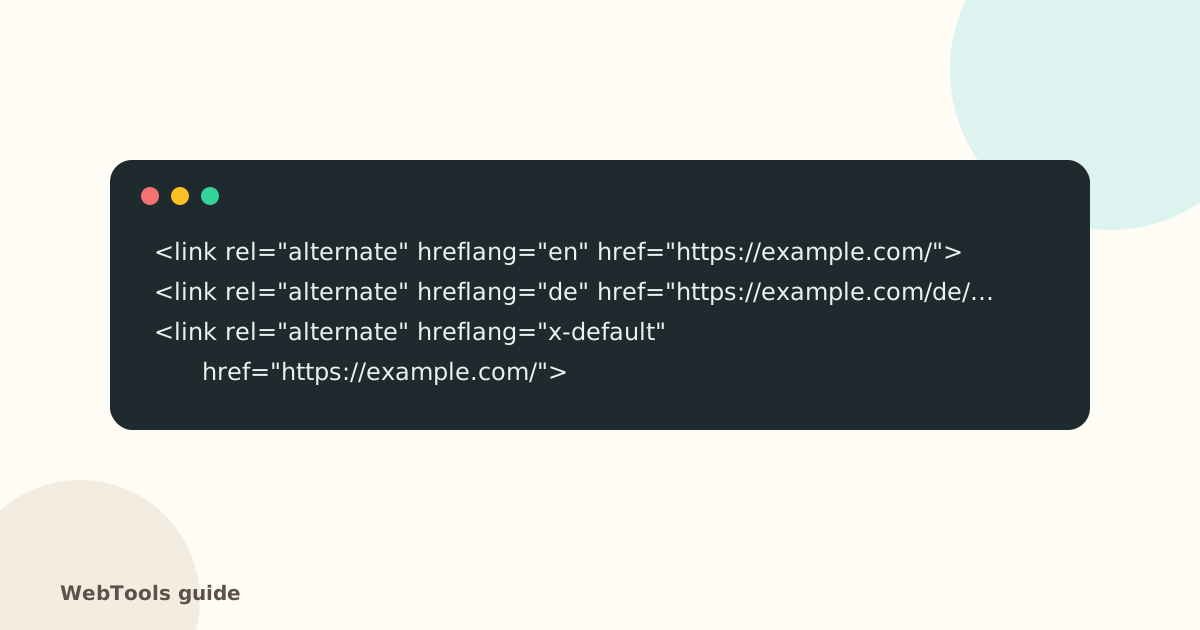
The rules
- Every version lists every version, including itself.
- Links must be reciprocal: if the English page points to German, the German page must point back.
- Use valid codes: language in ISO 639-1 (en, de, hu), optionally with a country in ISO 3166-1 (en-GB, de-AT). Note it's en-GB, not en-UK.
- Add x-default for the fallback version.
- Point to canonical, indexable pages that return 200.
How to add it
- WordPress: multilingual plugins such as WPML, Polylang and TranslatePress add hreflang automatically.
- Shopify: Shopify Markets and translation apps add it for each language.
- Large sites: you can list hreflang in the XML sitemap instead of the page head.
Common errors the audit finds
- invalid language or country codes,
- a page that doesn't reference itself,
- links to redirected or noindexed pages.
Check this on your own siteThe free website checker tests this and 40 other things in about 30 seconds, and links each problem to its guide.
Check my siteQuestions about this topic
Do I need hreflang for a single-language site?
No. hreflang is only for sites with the same content in several languages or for several countries.
What is x-default?
The version to show when no language matches the visitor, often the English page or a language picker.
Related guides
 SEOCanonical tags: fix duplicate content the right wayA canonical tag tells Google which address is the main copy of a page. Learn when to use it, how to add it, and how to fix missing, wrong and duplicate canonicals.1 min read
 SEOThin content: how much text does a page need to rank?Pages with very little text rarely rank. Learn what thin content is, when short pages are fine, and how to expand or merge pages so they answer the searcher's question.1 min read
 SEOFavicon: add the small icon Google and browsers showA favicon appears in browser tabs, bookmarks and next to your site in Google's mobile results. See the sizes you need and how to add one in WordPress, Shopify and HTML.1 min read