SEO-friendly URLs: short, readable addresses that rank
Short, lowercase URLs with hyphens are easier to read, share and rank. See good and bad examples and how to change URLs safely with 301 redirects.
By the WebTools team · Published 2026-11-10 · 1 min read
A good URL tells people and search engines what the page is about before they open it. It's also easier to share, remember and type.
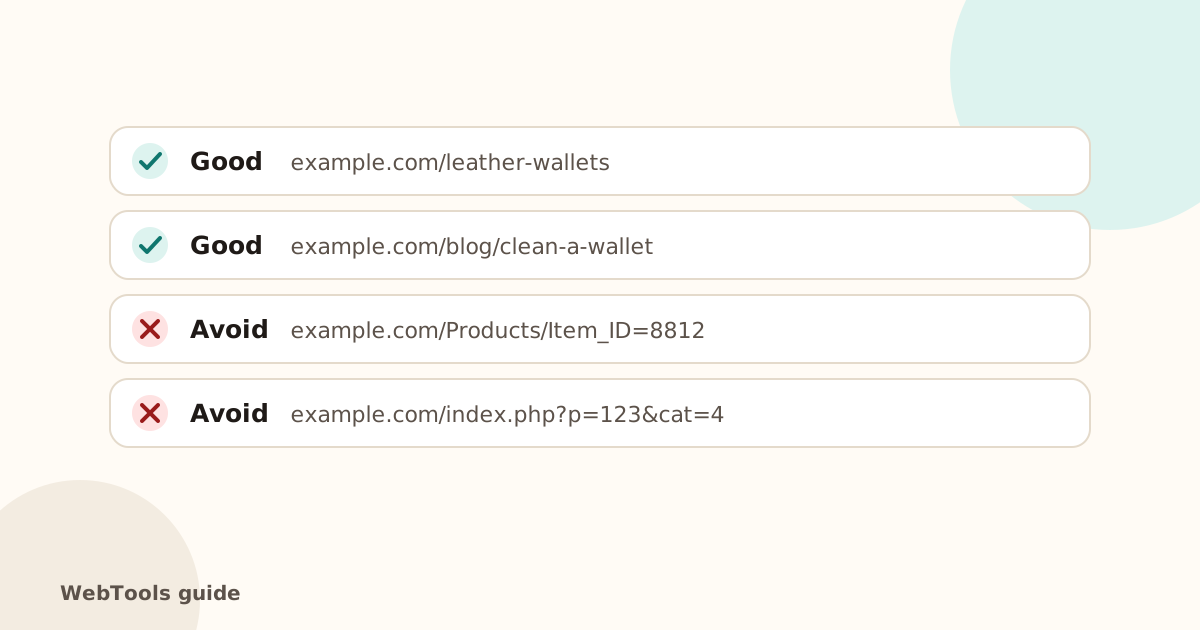
Rules of thumb
- Short: remove filler words like "and", "the", "of".
- Lowercase only: some servers treat /Shoes and /shoes as different pages.
- Hyphens between words, not underscores or spaces.
- One or two keywords that describe the page.
- No dates in evergreen articles, so they don't look outdated.
- Avoid IDs and long parameters where your platform allows it.
Set it up
- WordPress: Settings → Permalinks → Post name. You can edit each post's slug in the editor.
- Shopify: edit the URL handle under Search engine listing.
- Wix and Squarespace: edit the page URL in the page's SEO settings.
Changing URLs safely
- Change the address.
- Add a 301 redirect from the old one (most platforms offer this automatically when you edit the slug).
- Update internal links and your XML sitemap.
- Check with the SEO audit that no internal links go through redirects any more.
Check this on your own siteThe free website checker tests this and 40 other things in about 30 seconds, and links each problem to its guide.
Check my siteQuestions about this topic
Should I change existing URLs to make them prettier?
Only if they're really bad, and always with a 301 redirect from the old address. Changing URLs without redirects loses rankings and breaks links.
Do keywords in the URL help?
A little, and they help people see what the page is about before clicking. Don't stuff them; one or two words are enough.
Related guides
 SEOCanonical tags: fix duplicate content the right wayA canonical tag tells Google which address is the main copy of a page. Learn when to use it, how to add it, and how to fix missing, wrong and duplicate canonicals.1 min read
 SEOThin content: how much text does a page need to rank?Pages with very little text rarely rank. Learn what thin content is, when short pages are fine, and how to expand or merge pages so they answer the searcher's question.1 min read
 SEOFavicon: add the small icon Google and browsers showA favicon appears in browser tabs, bookmarks and next to your site in Google's mobile results. See the sizes you need and how to add one in WordPress, Shopify and HTML.1 min read