Mixed content: how to fix "not secure" warnings on HTTPS pages
Mixed content means an https page loads images, scripts or styles over http. Browsers block them and show "not secure". Here's how to find and fix every one.
By the WebTools team · Published 2026-11-10 · 1 min read
Your SSL certificate works, the address bar says https, yet the browser shows a warning or a broken image. The cause is almost always mixed content: the secure page loads some files over insecure http.
Why it matters
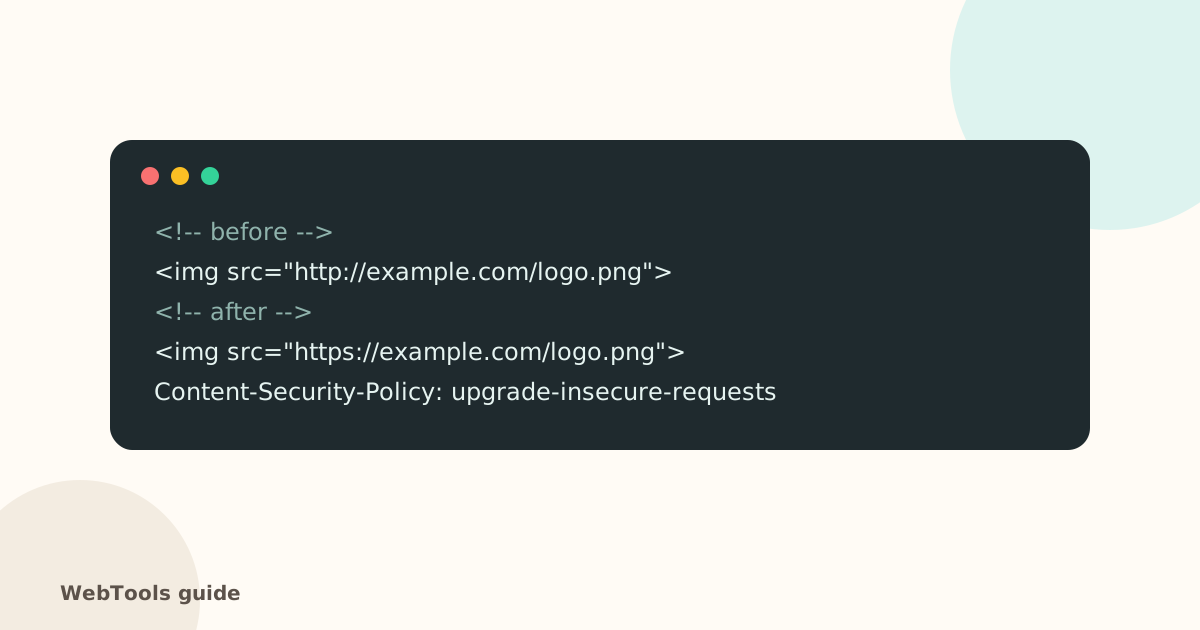
Browsers block insecure scripts and stylesheets outright (so the page can break), upgrade or block images, and remove the padlock. Visitors see "not secure", and trust drops.
How to find it
The full SEO audit lists every page that loads http:// files. In your browser, open the developer tools (F12) → Console to see mixed-content warnings for the current page.
How to fix it
- Update hard-coded links: in WordPress, a search-and-replace plugin (for example Better Search Replace) can change http://yourdomain to https://yourdomain in the database. Back up first.
- Check theme and plugin settings for logo, background and font addresses.
- Third-party files: change http to https in the embed code; if the provider doesn't support https, replace it.
- Quick safety net: add the header Content-Security-Policy: upgrade-insecure-requests (see security headers).
- Force HTTPS for the whole site with a 301 redirect (guide).
Check again
Reload the page with the console open, then re-run the audit. The list should be empty.
Questions about this topic
Why does my site show "not secure" even though I have SSL?
Usually because the page loads at least one file (image, script, stylesheet or iframe) over http://. Browsers then treat the whole page as partly insecure.
Is upgrade-insecure-requests enough?
It tells browsers to fetch http resources over https, which fixes most cases quickly. Still update the addresses themselves, because files that don't exist on https will break.
Related guides
 SecurityOpen ports, ping and traceroute: what your server shows the internetSee which ports your server answers on, why database and admin ports should be closed, and how ping and traceroute help diagnose slow or unreachable sites.1 min read
 SecurityHow to redirect HTTP to HTTPS (and www to non-www) the right wayForce HTTPS with a single 301 redirect, pick www or non-www, and remove redirect chains. Copy-paste rules for Apache, Nginx, Cloudflare and WordPress.1 min readSecurityYour SSL certificate expired. Here is what to doWhy browsers suddenly warn visitors away from your site, how to renew an SSL certificate, and how to make sure it never happens again.1 min read