Open ports, ping and traceroute: what your server shows the internet
See which ports your server answers on, why database and admin ports should be closed, and how ping and traceroute help diagnose slow or unreachable sites.
By the WebTools team · Published 2026-11-10 · 1 min read
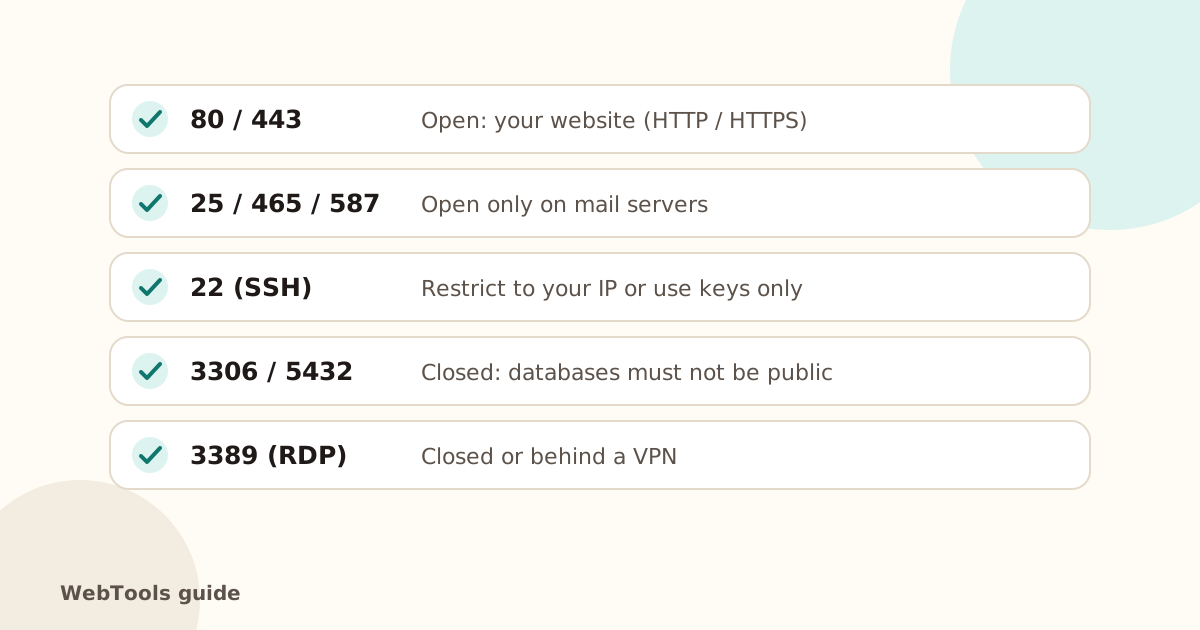
Every service on a server listens on a numbered port. Your website needs 80 and 443. Almost everything else, especially databases and remote desktop, should not be reachable from the whole internet.
Check your ports
The port checker tests common ports from the outside. open means something answers, closed means the server refused, and filtered means a firewall dropped the attempt.
Close what shouldn't be open
- Databases (MySQL 3306, PostgreSQL 5432, MongoDB 27017, Redis 6379): bind them to localhost or a private network.
- Remote desktop (3389) and admin panels: put them behind a VPN or an IP allow-list.
- SSH (22): keys only, no password login, and fail2ban or similar.
- Use your host's firewall (or ufw/firewalld on a VPS) to allow only what you need.
Ping and traceroute
- Ping measures the round-trip time to your server. High or unstable times point to network or server load problems. If ping is blocked, the checker measures the TCP connection to port 443 instead.
- Traceroute shows each network hop on the way to your server, which helps find where a connection slows down or stops. Some hosting environments don't allow it.
If your site is slow rather than unreachable, start with server response time.
Questions about this topic
Is it dangerous if port 22 is open?
Not by itself, but it attracts constant password-guessing bots. Use SSH keys, disable password login, and limit access to your IP address where you can.
Why does ping fail but the website works?
Many servers and firewalls block ping (ICMP) on purpose. The checker then measures the response time on port 443 instead, which is what visitors actually use.
Related guides
 SecurityMixed content: how to fix "not secure" warnings on HTTPS pagesMixed content means an https page loads images, scripts or styles over http. Browsers block them and show "not secure". Here's how to find and fix every one.1 min read
 SecurityHow to redirect HTTP to HTTPS (and www to non-www) the right wayForce HTTPS with a single 301 redirect, pick www or non-www, and remove redirect chains. Copy-paste rules for Apache, Nginx, Cloudflare and WordPress.1 min readSecurityYour SSL certificate expired. Here is what to doWhy browsers suddenly warn visitors away from your site, how to renew an SSL certificate, and how to make sure it never happens again.1 min read